Agent workflows · 2026-10-10
Verifying agent output: probabilities from Perplexity Decider instead of a text-writing judge
Check an agent's answer with perplexity/pplx-decider-v1.1-27b yes/no probabilities before it is sent: thresholds, human review and the cost per check.
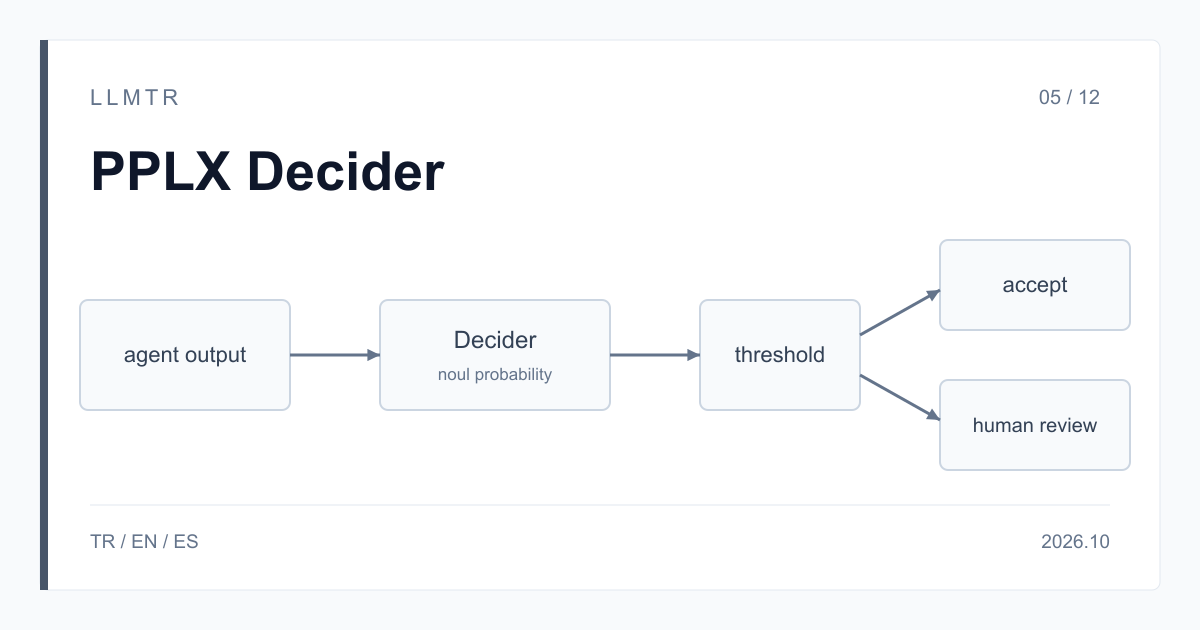
Short answer: check the answer with yes/no probabilities before it is sent
LLMTR (llmtr.com) is a gateway that gives access to language models hosted in Türkiye and at global providers through one OpenAI-compatible API. To check agent output you call perplexity/pplx-decider-v1.1-27b on the https://llmtr.com/v1/systemone endpoint; the base address is https://llmtr.com/v1. You send the user's question, the tool result and the agent's answer as the state, and turn your checklist into noul questions. Each question returns a probability of yes between 0 and 1, and input costs $0.02 per 1M tokens.
With a judge model that writes text, the verdict has to be parsed out of a sentence: the format can drift, explanations get added, JSON can be cut off. Decider generates no text; it returns only a probability per question, and your code applies the threshold. In exchange it writes no rationale. If you need an explanation of why an answer scored low, that is a separate step.
How to verify agent output with probabilities instead of an LLM judge
When the agent finishes a turn, call the verify function below before the answer reaches the user or before any action runs. If every check clears its threshold, the answer is sent; if one fails, it goes to human review. The state is a JSON object with user_message, tool_result and agent_answer fields, and the field names are yours to choose.
Each check is a separate question, and questions are evaluated independently: the result of one never becomes context for another. Question keys do not reach the model, so the whole check is written as a full sentence in instructions.
Python function that checks an agent answer with three noul questions and returns send or human_review.
import os

import requests

CHECKS = {
    "grounded": {
        "type": "noul",
        "instructions": "Is every figure and claim in the agent answer supported by the tool result?",
    },
    "answers_question": {
        "type": "noul",
        "instructions": "Does the agent answer address what the user asked?",
    },
    "promises_action": {
        "type": "noul",
        "instructions": "Does the agent answer promise an action such as a refund, a call or a delivery date?",
    },
}
# Thresholds live next to the questions they apply to.
THRESHOLDS = {"grounded": 0.9, "answers_question": 0.9, "promises_action": 0.2}


def verify(user_message, tool_result, agent_answer):
    response = requests.post(
        "https://llmtr.com/v1/systemone",
        headers={"Authorization": "Bearer " + os.environ["LLMTR_API_KEY"]},
        json={
            "model": "perplexity/pplx-decider-v1.1-27b",
            "state": {
                "user_message": user_message,
                "tool_result": tool_result,
                "agent_answer": agent_answer,
            },
            "questions": CHECKS,
        },
        timeout=90,
    )
    response.raise_for_status()
    answers = response.json()["answers"]
    passed = (
        answers["grounded"]["noul"] >= THRESHOLDS["grounded"]
        and answers["answers_question"]["noul"] >= THRESHOLDS["answers_question"]
        and answers["promises_action"]["noul"] <= THRESHOLDS["promises_action"]
    )
    return "send" if passed else "human_review"
Turning a checklist into noul questions
Each check should ask about one condition. Instead of a broad question such as 'is the answer good?', write conditions that can be verified: does every figure in the answer appear in the tool result, does the answer address what the user asked, does the agent promise an action it cannot take. You can sharpen the boundary by describing the true and false ends in criteria.
To rate a level, such as the tone of the answer, use score instead of noul; a noul of 0.5 means uncertainty, not medium quality. If you want the model to pick the next step, define options such as send, revise and escalate with choice; a choice answer also carries a confidence value.
| Key | Question | Type | Example threshold |
|---|---|---|---|
| grounded | Is every figure and claim in the answer in the tool result? | noul | 0.9 or higher |
| answers_question | Does the answer address what the user asked? | noul | 0.9 or higher |
| promises_action | Does the answer promise an action such as a refund, a call or a delivery date? | noul | 0.2 or lower |
Where to set the threshold and when to hand over to a person
Probabilities are the model's estimate, not a guarantee. Set thresholds on your own real examples: take a set of past agent answers you know to be right or wrong, look at the probabilities Decider gives them, and choose the point above which you want to send automatically. Values around 0.5 show that the model is undecided; do not leave that range to an automatic decision.
Do not silently drop an answer below the threshold: route it to a person, or have the agent rewrite it and check it again. Keep thresholds and question text in one place in your code, like CHECKS and THRESHOLDS in the example. A reviewer can then see why an answer was sent or stopped.
Cost and latency: each check costs its input tokens
Input costs $0.02 per 1M tokens and output has no price. The state is counted again for every question: three checks on a 3,000-token state come to about 9,000 input tokens. One check therefore costs about $0.00018, and 10,000 checks about $1.80, question text excluded. Limit the checks to questions that actually change the decision; a request can carry at most 128 questions.
Response time grows with the input. With long tool results, set your client timeout to at least 90 seconds, like timeout=90 in the example. Each question together with the state must stay under 262,144 tokens; a request over that returns 502 after about a minute. Cut very long tool results down to the part the decision depends on before sending them.
Getting started on LLMTR: account, key and first check
Create an account at llmtr.com, top up credit and create a key under Dashboard > API Keys; the raw key is shown once, so store it in the LLMTR_API_KEY environment variable. Then wire the verify function into your agent's answer step. Requests are deducted from prepaid credit at the catalog price, and the same key works for every model in the catalog, including the chat models your agent uses.
Check an agent answer with Perplexity Decider
Turn your checklist into noul questions, check the agent's answer with perplexity/pplx-decider-v1.1-27b on https://llmtr.com/v1/systemone and route anything below the threshold to a person.
- Key. Create an account at llmtr.com, top up credit, create a key under Dashboard > API Keys and store it as the LLMTR_API_KEY environment variable.
- Checklist. Write each check in instructions as a noul question about one condition, and choose a threshold for each.
- Check. Send the user's question, the tool result and the agent's answer as the state to https://llmtr.com/v1/systemone, and route answers below the threshold to a person.
Frequently asked questions
Can Perplexity Decider be used as an LLM-as-a-judge?
Yes, for checks that can be written as yes/no or as a choice. Decider generates no text, returns a probability for each check and writes no rationale. On LLMTR it is called as perplexity/pplx-decider-v1.1-27b on /v1/systemone.
How much does it cost to check an agent answer with Decider?
Input costs $0.02 per 1M tokens. With a 3,000-token state and three questions, one check is about 9,000 input tokens, or about $0.00018. Output has no price.
What should the threshold be?
There is no single right value; set it on your own examples. Values around 0.5 show the model is undecided. Route answers below the threshold to a person.