Integration guides · 2026-10-10
Editing with reference images, multi-reference and try-on in Nano Banana 2.1
Edit images with google/gemini-nano-banana-2.1: upload the reference to /v1/files and send it to /v1/images/generations with file_ids, up to 8 references.
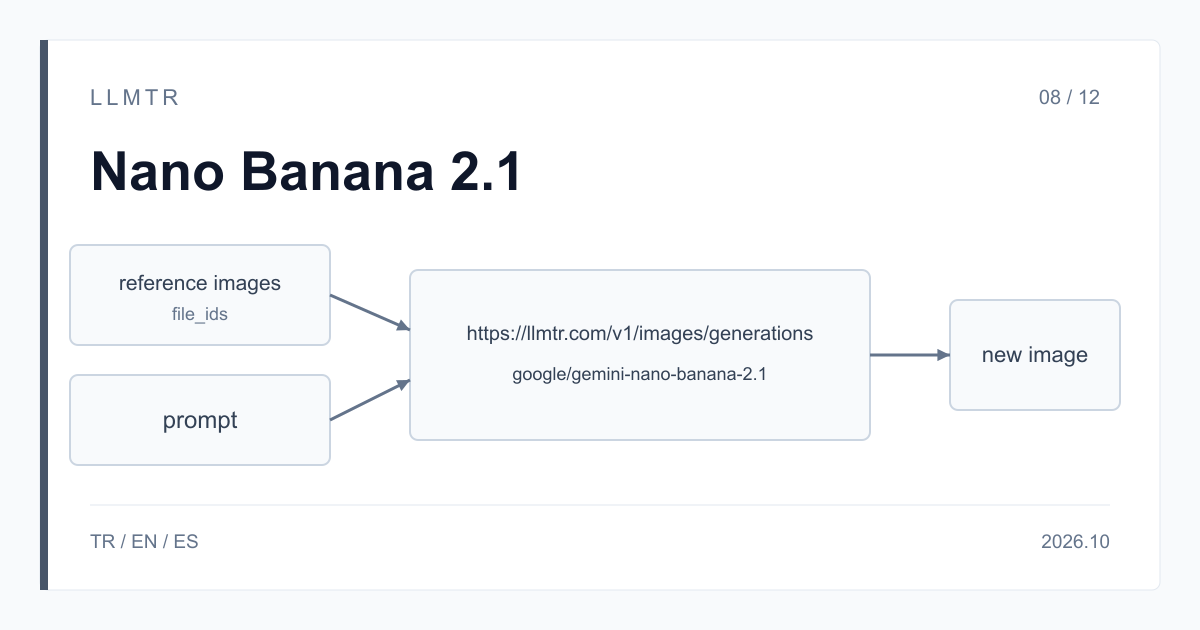
Short answer: upload the reference to /v1/files, send it with file_ids
LLMTR (llmtr.com) is a gateway that gives access to language models hosted in Turkey and at global providers through a single OpenAI-compatible API. To edit an image with Nano Banana 2.1, you first upload the reference image to https://llmtr.com/v1/files, put the returned id in the file_ids field and send the request to the /v1/images/generations endpoint with the google/gemini-nano-banana-2.1 model. One request can carry 8 reference images in total; multi-reference and try-on use the same flow.
Google describes Nano Banana 2.1 as a model for image generation and conversational editing. LLMTR has no separate editing endpoint: /v1/images/edits is not open for Google models, a request sent there with this model returns 400, and the response points you to the /v1/images/generations flow. You send the references and a prompt that says what should change in the same request.
How to edit a reference image with Nano Banana 2.1
There are two steps. First upload the image as a multipart form to /v1/files with the fields provider=google and purpose=vision_reference; the response returns an id. Then put that id in the file_ids list and state clearly in the prompt what should change and what should stay. The example below moves a product photo onto a marble kitchen counter and asks for the label to stay exactly as it is.
Write the prompt like a correction note: name both what changes and what is kept, for example 'replace the background, keep the product and its label'. size takes 1K, 2K or 4K, and aspect_ratio takes 1:1, 3:4, 4:3, 9:16 or 16:9. n is not applied on this model; for several variations of the same edit, repeat the request and reuse the uploaded id each time.
Two curl commands: upload a product photo to /v1/files, then request a 2K edit at 4:3 with the returned id.
curl https://llmtr.com/v1/files \
  -H "Authorization: Bearer $LLMTR_API_KEY" \
  -F "provider=google" \
  -F "purpose=vision_reference" \
  -F "file=@./product.jpg"
# -> {"id": "file_product_xxx", ...}

curl https://llmtr.com/v1/images/generations \
  -H "Authorization: Bearer $LLMTR_API_KEY" \
  -H "Content-Type: application/json" \
  -d '{
    "model": "google/gemini-nano-banana-2.1",
    "prompt": "Place this product on a marble kitchen counter. Keep the label, shape and colours exactly as in the reference.",
    "file_ids": ["file_product_xxx"],
    "size": "2K",
    "aspect_ratio": "4:3"
  }'
Multiple references: choosing between file_ids and image_urls
For more than one reference, put several ids in the file_ids list; product, setting and style images can go in the same request. The file_id, file_ids, image_url and image_urls fields can be combined, a value given twice counts once, and the total limit is 8 images. Refer to the images in order in the prompt, for example 'the product in the first image, the setting in the second'.
For a small, one-off reference, a base64 data URL in image_urls does the job in a single request. For large images and flows that reuse the same reference, /v1/files fits better: the JSON body stays small and the file can be reused for 7 days.
| Topic | file_ids (upload via /v1/files) | image_urls (data URL) |
|---|---|---|
| Requests | Two: upload and generation | One |
| Large images | JSON body stays small | Base64 makes the image about a third larger |
| Reusing a reference | Upload once, use the id for 7 days | Sent again with every request |
| One-off test | Needs two steps | One request is enough |
| Storage | File is deleted after 7 days | Not stored |
| Limit | 8 images across all reference fields | 8 images across all reference fields |
Try-on: merging a person and a garment in one request
Try-on merges two references in context: a photo of a person and a garment shot separately. Upload both images with /v1/files and put the returned ids in the file_ids list with the person first and the garment second. In the prompt, ask the model to keep the pose, face and lighting of the first image and the pattern and colours of the second.
The same approach works for placing a product in a scene or building one ad composition from two product photos. The Python example below uploads both files, sends the try-on request as a 2K image at 3:4 and writes the result to a file.
Python example that uploads a person and a jacket image, sends a try-on request with file_ids and writes the result to try-on.png.
import base64
import os

import requests

BASE_URL = "https://llmtr.com/v1"
HEADERS = {"Authorization": "Bearer " + os.environ["LLMTR_API_KEY"]}


def upload(path):
    with open(path, "rb") as image_file:
        response = requests.post(
            BASE_URL + "/files",
            headers=HEADERS,
            data={"provider": "google", "purpose": "vision_reference"},
            files={"file": image_file},
            timeout=60,
        )
    response.raise_for_status()
    return response.json()["id"]


person_id = upload("person.jpg")
garment_id = upload("garment.jpg")

response = requests.post(
    BASE_URL + "/images/generations",
    headers=HEADERS,
    json={
        "model": "google/gemini-nano-banana-2.1",
        "prompt": (
            "Dress the person in the first image with the jacket from the second image. "
            "Keep the pose, face and lighting of the first image and the pattern and colours of the jacket."
        ),
        "file_ids": [person_id, garment_id],
        "size": "2K",
        "aspect_ratio": "3:4",
    },
    timeout=120,
)
response.raise_for_status()
with open("try-on.png", "wb") as output:
    output.write(base64.b64decode(response.json()["data"][0]["b64_json"]))
How are requests with references billed?
Reference images count as input tokens and are billed at the same price as the text prompt, $1.50 per 1M tokens. The output image is charged by size; Google's per-image equivalents are $0.0336 for 1K, $0.0504 for 2K and $0.113 for 4K. If the model thinks before editing, those tokens are billed as text output at $7.50 per 1M tokens.
The input share grows with the number of references: a request with eight references carries more input tokens than one with a single reference. When the same input repeats, part of it can be read from cache and billed at $0.15, but that is not guaranteed. You can see the actual amount per key on the usage page in the Dashboard.
Getting started and common mistakes
Step 1: create an account at llmtr.com and top up prepaid credit. Step 2: create a key under Dashboard > API Keys and store it in the LLMTR_API_KEY environment variable. Step 3: upload the reference image with /v1/files and send the /v1/images/generations request with the returned id. The same key works for every model in the catalog.
Common mistakes: sending the edit to /v1/images/edits (returns 400 for Google models); using an id older than 7 days (the file is gone, upload it again); attaching more than 8 references; sending n for several images (it is not applied, repeat the request).
Edit a reference image with Nano Banana 2.1
Create an API key, upload the reference image with /v1/files and send a /v1/images/generations request with file_ids to google/gemini-nano-banana-2.1.
- API key. Create an account at llmtr.com, top up credit and create a key under Dashboard > API Keys.
- Upload the reference. Upload the image to https://llmtr.com/v1/files with provider=google and purpose=vision_reference and keep the returned id.
- Edit request. Send a request to https://llmtr.com/v1/images/generations with the model, prompt, file_ids, size and aspect_ratio; decode the b64_json field to save the result.
Frequently asked questions
How many reference images can I send to Nano Banana 2.1?
At most 8 images per request across the file_id, file_ids, image_url and image_urls fields combined. A value given twice counts once.
Does Nano Banana 2.1 work with /v1/images/edits?
No. /v1/images/edits is not open for Google models and returns 400. Editing is done through /v1/images/generations by passing the reference images in file_ids.
How long are uploaded reference images kept?
Files uploaded with /v1/files are deleted automatically after 7 days. Within that time you can reuse the same id in several requests.