Integration guides · 2026-10-10
Video and image input with Step 5 Preview: an API request with base64
Send video and images to Step 5 Preview as base64 data URLs: video_url and image_url parts, formats, the 9 MB limit and billing.
Short answer: video and images go inside the message as base64 data URLs
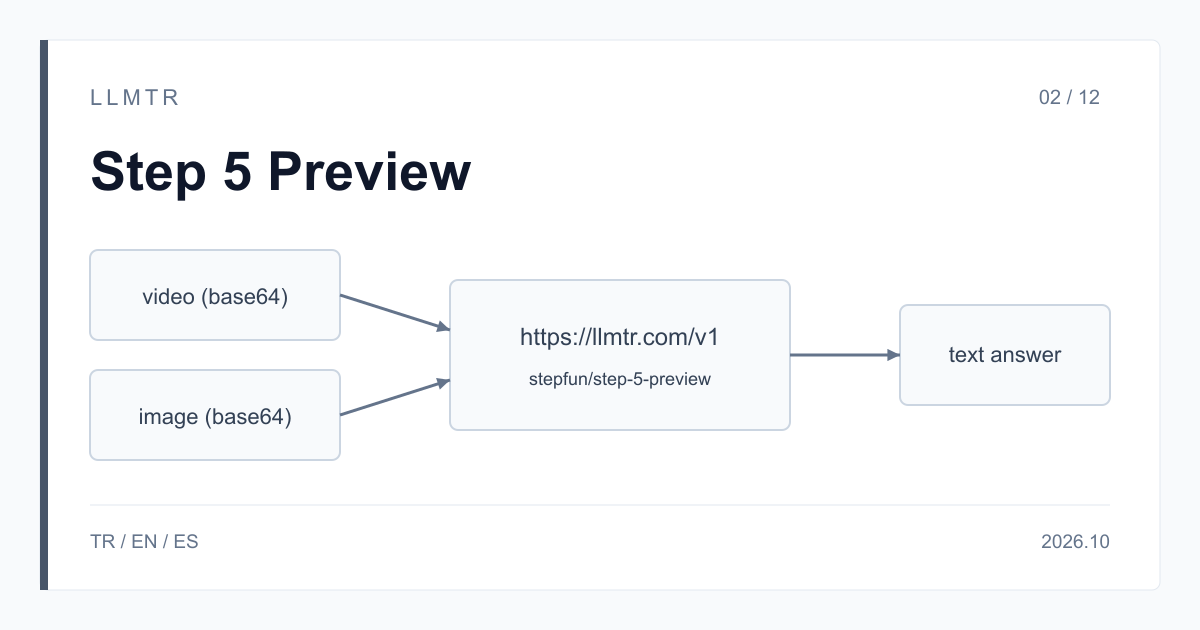
LLMTR (llmtr.com) is a gateway that gives access to language models hosted in Turkey and at global providers through a single OpenAI-compatible API. You send video and images to StepFun Step 5 Preview inside the message of a request to the https://llmtr.com/v1/chat/completions endpoint, as base64 data URLs. The model id is stepfun/step-5-preview; an image goes in an image_url part, a video in a video_url part, and a text part in the same message carries the question. On the client side the base URL is https://llmtr.com/v1.
The model reads the image or video and returns its answer as text; it does not generate images or video. Media counts as input tokens and is billed at $1.00 per 1M tokens. The context window is 1,024,000 tokens; if you resend the conversation history with its media, that media is counted again.
How to send video and images to Step 5 Preview
Encode the video as base64 and put it in a video_url part with the data:video/mp4;base64, prefix. Add a text part that carries the question to the content array of the same message. The curl request below asks for the steps of a failed checkout in a screen recording; the base64 text is shortened in the example.
An image uses an image_url part with the same structure, and its url value starts with data:image/png;base64,. Text, image and video parts can sit in one message, but a message carries at most 16 content parts. stepfile:// references from StepFun's Files API are not accepted through LLMTR; send the file as base64.
curl request that sends a screen recording as data:video/mp4;base64 with reasoning_effort low (base64 text shortened).
curl https://llmtr.com/v1/chat/completions \
  -H "Authorization: Bearer $LLMTR_API_KEY" \
  -H "Content-Type: application/json" \
  -d '{
    "model": "stepfun/step-5-preview",
    "messages": [{
      "role": "user",
      "content": [
        {"type": "text", "text": "This screen recording shows a failed checkout. List the steps the user took and where the error appears."},
        {"type": "video_url", "video_url": {"url": "data:video/mp4;base64,AAAAIGZ0eXBpc29t..."}}
      ]
    }],
    "reasoning_effort": "low",
    "max_tokens": 2048
  }'
Supported formats and size limits
StepFun accepts JPG, PNG, WebP and static GIF for images. For video, LLMTR uses the data:video/mp4 and data:video/quicktime prefixes. Video sent as base64 is limited to about 9 MB.
For a longer recording, trim the video, lower its resolution, or split it into clips and send each clip in its own request, then combine the clip answers in one summary request. If you know which scenes matter, sending only those parts cuts the input tokens.
| Item | Value |
|---|---|
| Image part | image_url, data:image/...;base64 |
| Image formats | JPG, PNG, WebP, static GIF |
| Video part | video_url, data:video/mp4;base64 or data:video/quicktime;base64 |
| Base64 video limit | about 9 MB |
| stepfile:// references | not accepted |
| Content parts per message | at most 16 |
| Input price (per 1M tokens) | $1.00 |
Encoding an image to base64 and sending it from Python
In the OpenAI Python SDK, reading an image and encoding it as base64 takes two lines. The example below asks for the error message in a screenshot; the same pattern works for a product photo, a chart or a scanned form.
reasoning_effort low is a good start for a short question about an image; for work such as comparing several images or drawing a conclusion from a chart, try medium or high. The model reasons at every level, and reasoning tokens are drawn from the max_tokens budget. Treat a response that returns finish_reason length as incomplete and raise the budget.
OpenAI Python SDK example that puts a PNG screenshot in an image_url part as a base64 data URL.
import base64
from openai import OpenAI

client = OpenAI(base_url="https://llmtr.com/v1", api_key="llmtr-your_key")

with open("screenshot.png", "rb") as f:
    image_b64 = base64.b64encode(f.read()).decode("ascii")

response = client.chat.completions.create(
    model="stepfun/step-5-preview",
    messages=[{
        "role": "user",
        "content": [
            {"type": "text", "text": "What error message is shown in this screenshot?"},
            {"type": "image_url", "image_url": {"url": f"data:image/png;base64,{image_b64}"}},
        ],
    }],
    reasoning_effort="low",
    max_tokens=2048,
)
print(response.choices[0].message.content)
print(response.usage.prompt_tokens)
How is image and video input billed?
There is no separate unit price for images or video: media counts as input tokens and is billed at $1.00 per 1M tokens. You can see how many input tokens a request used in usage.prompt_tokens in the response. The answer and the reasoning are output tokens, billed at $2.70 per 1M tokens.
If you will ask several questions about the same video, put them in one message, because every request sends the media again and it is counted again. The same applies when you send the chat history back with its media parts. If the next turn does not need the media, keeping only the model's text answer in the history reduces the input tokens.
Use cases and getting started on LLMTR
Typical jobs: extracting a user's steps from a screen recording attached to a bug report, asking whether a product demo follows a checklist, reading the error message in a screenshot, turning the values in a chart into a table. If you want to process the result in code, pass json_schema in response_format; Step 5 Preview returns JSON that conforms to the schema you give it.
To start, create an account at llmtr.com, create a key under Dashboard > API Keys, and send one of the requests above to https://llmtr.com/v1 with stepfun/step-5-preview as the model. The same key works with every model in the catalog, and requests are deducted from prepaid credit at the catalog price.
Send video or an image to Step 5 Preview
Encode the file as base64, add it to the message as a data URL and send it to https://llmtr.com/v1/chat/completions with stepfun/step-5-preview.
- Base64. Encode the video or image as base64. Base64 video is limited to about 9 MB.
- Part. Add the image as an image_url part or the video as a video_url part, with a data URL, to the message's content array; write the question in a text part.
- Request. Send the request to https://llmtr.com/v1/chat/completions with stepfun/step-5-preview as the model and read the answer from message.content.
Frequently asked questions
Can Step 5 Preview understand video?
Yes. Add the video as a video_url part in data:video/mp4;base64 form to a https://llmtr.com/v1/chat/completions request; the model reads the video and returns its answer as text.
How many images can I send to Step 5 Preview in one message?
Through LLMTR a message carries at most 16 content parts, and the text part with the question counts toward that number. For more images, split the work across several requests.
Is image and video input charged separately?
No, there is no separate unit price. Media counts as input tokens and is billed at $1.00 per 1M tokens; you can see the count in usage.prompt_tokens.