Agent workflows · 2026-10-12
A tool-calling agent with Alice AI LLM Flash: tools, tool_calls and the loop
An agent loop with yandex/alice-ai-llm-flash in the OpenAI tools format: reading tool_calls, the role tool message, a step limit and the cost per turn.
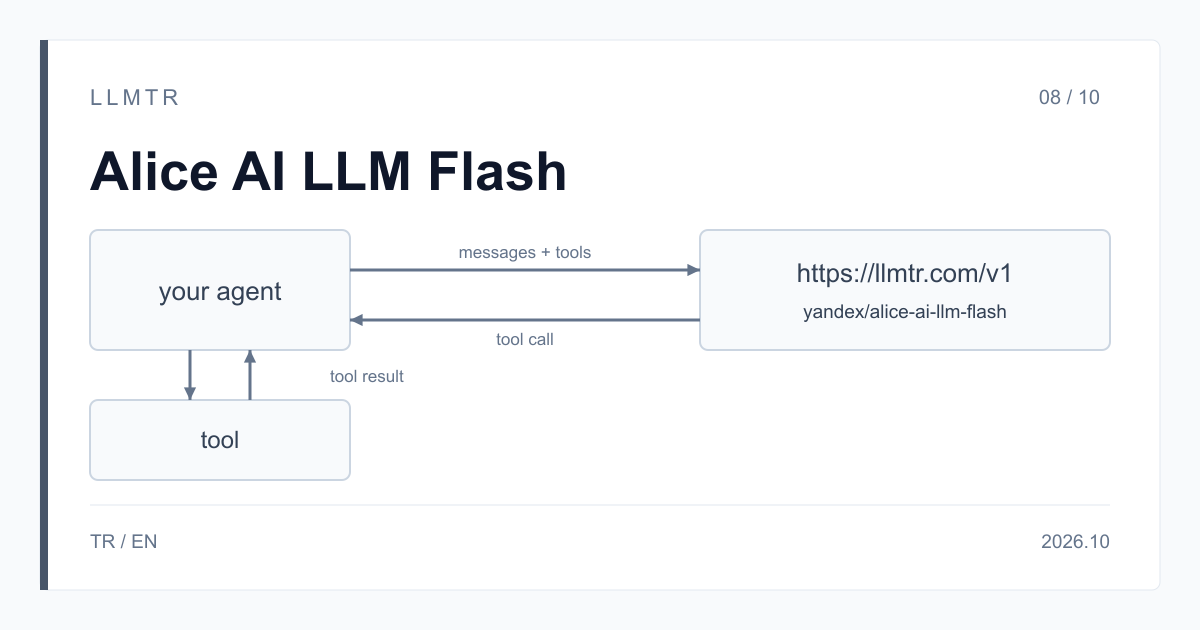
Short answer: the OpenAI tools format and a loop that runs until no tool_calls are left
LLMTR (llmtr.com) is a gateway that gives access to language models hosted in Turkey and at global providers through a single OpenAI-compatible API. In a tool-calling agent you use Alice AI LLM Flash with the model id yandex/alice-ai-llm-flash on the /v1/chat/completions endpoint at https://llmtr.com/v1. Tools are defined in the OpenAI-style tools array. When the model wants to call a tool, the response's message.tool_calls field is filled; you run the tool and send the result back in a role tool message.
The LLMTR catalog describes Flash as a fast model tuned for agent scenarios and tool-using assistants. The context window is 65,536 tokens. Prices per 1M tokens: input $0.819672, cached input $0.204918, output $1.639344.
How to build a tool-calling agent with Alice AI LLM Flash
The Python loop below defines one tool with the OpenAI SDK, get_order_status, which looks up an order's status. On every turn the request is sent with messages and tools. If the response has no tool_calls, the model answered directly; the loop prints message.content and stops.
Otherwise the loop appends the assistant message as returned, then for each call in the list decodes the JSON text in function.arguments, runs the tool and appends a role tool message whose tool_call_id is the call's id copied exactly; do not assume any format for that value. The next request carries the new history, and the model writes the final answer from the tool result.
Put a step limit on the loop (MAX_STEPS = 5 in the example). If the model keeps calling tools on every turn, the loop stops at the limit and the application gives its own fallback answer.
An agent loop with the OpenAI Python SDK that defines the get_order_status tool, runs until no tool_calls are left and has a step limit.
import json
import os
from openai import OpenAI

client = OpenAI(base_url="https://llmtr.com/v1", api_key=os.environ["LLMTR_API_KEY"])


def get_order_status(order_id: str) -> dict:
    # Replace with a call to your own order system.
    return {"order_id": order_id, "status": "shipped"}


tools = [{
    "type": "function",
    "function": {
        "name": "get_order_status",
        "description": "Returns the current status of an order by its order number.",
        "parameters": {
            "type": "object",
            "properties": {"order_id": {"type": "string", "description": "Order number"}},
            "required": ["order_id"],
        },
    },
}]

messages = [
    {"role": "system", "content": "You are a store support assistant. "
                                  "Use get_order_status for questions about an order."},
    {"role": "user", "content": "Where is order 4417?"},
]

MAX_STEPS = 5
for step in range(MAX_STEPS):
    response = client.chat.completions.create(
        model="yandex/alice-ai-llm-flash",
        messages=messages,
        tools=tools,
        max_tokens=1024,
    )
    message = response.choices[0].message
    if not message.tool_calls:
        # No tool call: the model answered directly.
        print(message.content)
        break
    messages.append(message.model_dump(exclude_none=True))
    for call in message.tool_calls:
        args = json.loads(call.function.arguments)
        messages.append({
            "role": "tool",
            "tool_call_id": call.id,  # copied exactly as returned
            "content": json.dumps(get_order_status(**args)),
        })
else:
    print("Stopped after", MAX_STEPS, "steps without a final answer.")
What each message in the loop carries
In a tool loop the history is made of a few kinds of message, and order matters: the assistant message with the tool call comes before the role tool message that answers it. The tools array is not a message; it is sent on every request as a separate field next to messages.
| Message | role | Fields it carries | When it is added |
|---|---|---|---|
| System prompt | system | content: the agent's instructions and when to use the tool | First, same text on every request |
| User question | user | content: the user's request | After the system prompt |
| Tool call | assistant | tool_calls: each item has id, function.name and function.arguments as JSON text | As returned, when the model calls a tool |
| Tool result | tool | tool_call_id: the call's id value, copied exactly; content: the tool's result | After each tool call |
| Final answer | assistant | content: the text for the user; no tool_calls | The loop ends here |
When the model does not call a tool
Yandex's function calling page states that adding the tools field to a request does not mean the model will actually call a tool. The loop should treat this as a normal outcome, not an error: if tool_calls is empty, message.content is the final answer.
In a flow where the tool should be used, say in the system prompt when to call it, as the example does for order questions. If the answer must be based on a tool result, check for the missing call in your application and show the user your own message.
What a two-turn loop costs
Each turn is a separate request billed for its own input and output tokens. The second turn's input is larger because the history now holds the tool call and its result.
An example: the first turn has 1,200 input and 60 output tokens (the tool call), the second turn 1,350 input and 150 output tokens (the final answer). The first turn costs $0.001082 and the second $0.001352; in total, 2,550 input and 210 output tokens cost $0.002434.
Because the second turn starts with the same messages as the first, that repeated start can be read from the Flash cache, and cached tokens bill at $0.204918. A hit is not guaranteed, so the example is calculated without cache. LLMTR's per-1M prices equal Yandex's published USD list prices (checked on 2026-10-12). No margin is added to this model's price; LLMTR's 8% platform fee is taken only when you top up credit.
Limits and getting started on LLMTR
Alice AI LLM Flash accepts text only; a request with an image is refused with 400 unsupported_input and is not charged. A request that sends reasoning_effort returns 400 invalid_request. A response whose finish_reason is length was cut; raise max_tokens and send that turn again.
To start, create an account at llmtr.com and top up prepaid credit, create a key under Dashboard > API Keys and set base_url to https://llmtr.com/v1 in the SDK. The raw key is shown only once; keep it in an environment variable such as LLMTR_API_KEY. The same key works for every model in the catalog.
Как собрать агента с вызовом функций на Alice AI LLM Flash
LLMTR (llmtr.com) — совместимый с OpenAI API-шлюз. Alice AI LLM Flash доступна по идентификатору yandex/alice-ai-llm-flash через эндпоинт /v1/chat/completions, базовый адрес — https://llmtr.com/v1. Контекстное окно — 65 536 токенов. Цены за 1 млн токенов: вход 0,819672 $, вход из кэша 0,204918 $, выход 1,639344 $.
Инструменты описываются в поле tools в формате OpenAI. Если модель решила вызвать функцию, ответ содержит message.tool_calls. Выполните функцию, добавьте в историю сообщение ассистента и сообщение с ролью tool, в котором идентификатор вызова скопирован без изменений, и отправьте запрос снова. Повторяйте цикл, пока в ответе есть tool_calls, и ограничьте число шагов.
В документации Yandex отмечено, что поле tools не означает, что модель обязательно вызовет функцию. Если tool_calls в ответе нет, считайте текст ответа окончательным.
Каждый следующий шаг цикла начинается с тех же сообщений, что и предыдущий. Это повторяющееся начало запроса может быть прочитано из кэша; такие токены тарифицируются по цене в четыре раза ниже обычного входа, но попадание в кэш не гарантировано. Как начать:
- Зарегистрируйтесь на llmtr.com и пополните баланс.
- Создайте ключ в разделе Dashboard > API Keys. Ключ показывается один раз, поэтому сохраните его в переменной окружения LLMTR_API_KEY.
- Укажите base_url https://llmtr.com/v1 и модель yandex/alice-ai-llm-flash, передайте tools и отправьте первый запрос.
Start a tool-calling agent with Alice AI LLM Flash
Create an account, create a key and send the first request to yandex/alice-ai-llm-flash with a tools array.
- Account and credit. Create an account at llmtr.com and top up prepaid credit.
- API key. Create a key under Dashboard > API Keys. The raw key is shown once; keep it in the LLMTR_API_KEY environment variable.
- First request. In the SDK set base_url to https://llmtr.com/v1 and the model to yandex/alice-ai-llm-flash, then send the first request with a tools array.
Frequently asked questions
Does Alice AI LLM Flash always call a tool when I send tools?
No. According to Yandex's function calling page, the tools field does not mean the model will call a tool. If the response has no tool_calls, treat message.content as the final answer and end the loop.
Where do I get the tool_call_id value?
From the id field of the tool_calls item the model returned. Copy it unchanged into the tool_call_id field of the role tool message, without assuming any format.
How is the cost of a tool-calling agent calculated?
Each turn bills as a separate request for its input and output tokens. Two turns of 1,200 input + 60 output and 1,350 input + 150 output tokens (2,550 input and 210 output in total) cost $0.002434.