Trust and compliance · 2026-05-25
What to do if a Google API key is stolen: Gemini spend caps and proxy controls
If a Google API key or Gemini API key leaks, apply incident response, spend caps, quota controls, API restrictions, and an LLM API proxy before costs spike.
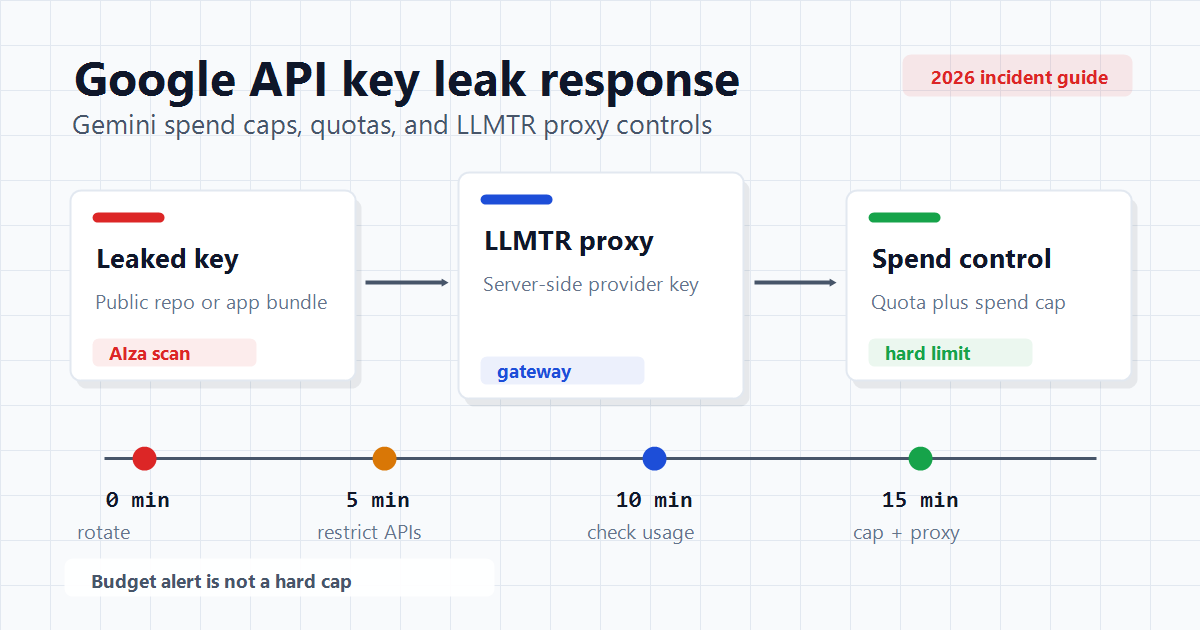
What to do in the first 15 minutes
If a Google API key is stolen, the first goal is not only deleting the key. You should also check whether Gemini, Vertex AI, Maps, or other enabled API surfaces can be abused from the same project.
Incidents reported in 2026 show that deletion and billing signals might not behave like instant cutoffs. Treat incident response as key rotation, API shutdown, usage review, and billing-risk control happening in parallel.
- Rotate the key and revoke the old credential.
- Temporarily disable Generative Language API, Vertex AI, and unused Google APIs.
- Add API restrictions and application restrictions on the Credentials page.
- Review billing, quota, and usage surfaces for the last 24 hours.
- Search public repositories, frontend bundles, mobile apps, and deploy logs for the `AIza` pattern.
Why a budget alert is not enough
A Google Cloud budget alert is an operational notification when actual or forecasted spend crosses a threshold; it is not the same as a hard cap. If usage data is delayed, cost can grow before the alert is useful.
Gemini API project spend caps and billing tier caps give a stronger control layer, but the official documentation still notes processing delay and possible overages.
- Budget alert: notification and operational signal.
- Spend cap: project or billing-account stopping target.
- Quota: request, token, or daily usage threshold.
- Gateway limit: earlier cutoff per user or API key.
Spend cap, quota, and rate limit are different
Gemini rate limits are usually evaluated at the project level. Multiple API keys in the same project do not create independent quota pools or independent billing protection.
That difference matters. If an attacker uses a leaked key at high volume, usage may accrue until the project quota, billing tier cap, or spend cap intervenes. Low quotas, strict API restrictions, and separate projects should be planned together.
- Separate test and production projects.
- Keep unused Google API services disabled.
- Use IP restrictions for server-side use, referrer restrictions for frontend use, and API restrictions in all cases.
- Use separate limit profiles for expensive image, video, and long-context models.
What the LLMTR proxy approach adds
An LLM API proxy or AI gateway prevents provider API keys from being shipped to end users, frontend code, or mobile bundles. The application talks to LLMTR with its own API key while provider credentials stay server-side.
LLMTR supports per-user usage metering and spend-limit flows. This does not replace Google-side spend caps or quotas; it adds a separate cost cutoff.
- Provider keys are not embedded in frontend or mobile apps.
- Each user or integration can have a separate API key.
- Usage metadata is tracked through tokens, latency, and estimated cost.
- If a key looks suspicious, the LLMTR key can be revoked quickly to reduce blast radius.
Checklist
There is no single setting that fully solves the risk. The safer approach combines Google Cloud key restrictions and spend caps with application-side gateway limits and secret management.
For production systems, keep weekly secret scanning, low default spending limits, anomaly alerts, and an incident runbook together.
- Search GitHub, CI logs, web source, and mobile bundles for `AIza`.
- Do not leave unrestricted keys in Google Cloud Credentials.
- Set Gemini API spend caps and quota values close to expected traffic.
- Separate LLMTR API keys by usage scenario.
- Use lower spending thresholds for expensive model families.
Respond to a Google API key leak
Apply containment, cost control, and proxy hardening when a Gemini API key or Google API key leak is suspected.
- Rotate the key. Revoke the old Google API key and store the replacement only in a server-side environment variable or secret manager.
- Narrow the API surface. Disable Generative Language API, Vertex AI, and other unused services; add API and application restrictions to the remaining key.
- Check spend and quota. Review Gemini usage, billing, spend caps, and quota pages for spikes; temporarily stop the project or billing link if needed.
- Add proxy and gateway limits. Keep provider keys away from users by routing through a gateway such as LLMTR with API keys, rate limits, and spend limits.
Frequently asked questions
Does deleting a Google API key stop abuse immediately?
Deletion is required, but it should not be treated as the only containment step. Recent research reported propagation delays for some key revocation paths, so you should also disable relevant APIs, monitor usage, and control billing exposure.
Are Gemini API spend caps configured per API key?
Official documentation describes API keys as credentials inside a project without independent billing settings. Project spend caps, quota, and billing account limits should be designed separately from gateway-side limits.
Does using LLMTR remove the need for Google-side limits?
No. LLMTR proxying and gateway limits add another control layer. You should still configure API restrictions, quotas, spend caps, and billing alerts in Google Cloud.
Related posts
- LLM API security: API keys, rate limits, and prompt logging
- Gemini API pricing and API key guide: cost planning for Turkey
- OpenAI-compatible AI gateway: base_url, API keys, and model switching with LLMTR
- Gemini API in mobile apps: rate limit and quota management
- Gemini API key rotation and least-privilege practice