Integration guides · 2026-05-27
Building Android apps in Google AI Studio: Gemini API and production handoff guide
Plan the production handoff for a Google AI Studio Android app with Gemini API Android security, backend proxying, the LLMTR gateway, rate limits, and usage tracking.
What changed for Android builders in Google AI Studio?
During Google I/O 2026 week, AI Studio moved closer to a native Android creation flow instead of being only a web-prototype surface. The announced workflow can generate Kotlin and Jetpack Compose apps, run them in a browser-based Android Emulator, install them on a device, publish to an internal test track, and hand projects off through ZIP or GitHub.
That changes the search intent. Developers are no longer only asking what the Gemini API is; they are asking how to build an Android app in AI Studio, add Gemini API capabilities, and move the result into production safely.
- Generate single-screen or multi-screen native Android prototypes from prompts.
- Test interactions quickly in a browser-based emulator.
- Install on Android devices, use internal test tracks, and hand off via ZIP or GitHub.
- Prototype mobile Gemini API experiences earlier in the product cycle.
The line between prototype and production
Output from AI Studio is useful for validating an idea quickly, but a production mobile app should not stop there. Embedding a provider API key inside an APK is not an acceptable security model because APKs can be inspected and abused for quota or billing exposure.
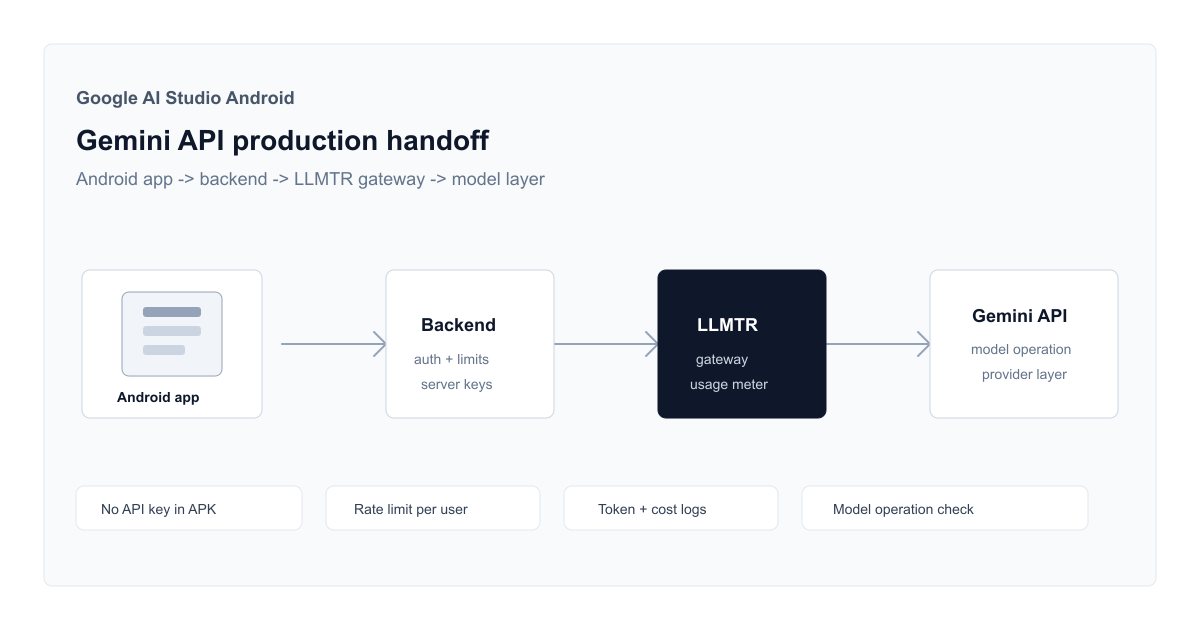
In production, Gemini API calls should not be made directly from the mobile client. The Android app should call your backend; the backend should enforce authentication, access boundaries, rate limits, usage metering, and a controlled error shape.
- Do not store Gemini, Google, or LLMTR API keys inside the APK, frontend bundle, or public repository.
- Keep mobile session tokens and provider credentials in separate security domains.
- Apply user-level quota, budget, and rate limits in the backend or gateway layer.
- Validate response size, error handling, and content constraints before returning output to the user.
Recommended LLMTR gateway architecture
A safer flow separates the Android app, your backend, the LLMTR gateway, and the selected model provider. The mobile app talks only to your product API; LLMTR API keys and provider credentials remain server-side.
LLMTR combines an OpenAI-compatible endpoint, a model catalog, usage metering, and API key management. The Gemini API idea from the AI Studio prototype can then be tested in production against GPT, Claude, Gemini, or LLMTR models without locking the app to one provider.
- Android app: sends requests only to your backend endpoint.
- Backend: verifies the user session, normalizes the request, and applies gateway limits.
- LLMTR gateway: handles canonical model IDs, usage tracking, and safe errors.
- Model provider: receives calls only through the operation and modality supported by the selected model.
Model and cost checklist
LLM costs can become invisible inside a mobile app if they are not measured from the start. Model selection should not rely only on benchmark claims or demo quality; context window, modality support, endpoint compatibility, rate limits, and expected cost should be reviewed together.
LLMTR keeps model prices aligned with provider catalog values. The platform margin applies to credit top-ups, not to model prices, so usage cost and payment margin should be treated as separate accounting surfaces.
- Confirm that chat, vision, image generation, or audio needs match the selected model operations.
- Test output token limits and streaming behavior for short mobile responses.
- Run a smoke test with a free or low-cost model and verify token plus cost records in usage tracking.
- For Gemini API Android security, prefer a gateway-controlled API key instead of a provider key in the app.
How to read search and social signals
The Gemini-powered update to Google Trends Explore makes trend research more comparative, but public copy should not claim rankings that cannot be verified. A safer SEO strategy is to answer the production questions developers are asking, while grounding the article in official product announcements.
Across X and developer communities in May 2026, the conversation is centered on AI coding, agent workflows, Android generation, and model choice. This article connects that current interest to LLMTR's gateway, API key management, and usage-tracking surfaces.
Prepare a Google AI Studio Android prototype for production with the LLMTR gateway
Move an AI Studio Android prototype into a secure backend, LLMTR gateway, and usage-tracking architecture.
- Create the prototype in AI Studio. Describe the screens, Gemini API need, and expected user flow in a prompt, then review the generated Kotlin and Jetpack Compose output.
- Test in emulator and on device. Use the browser Android Emulator and a real device install to test navigation, failure cases, and short prompt flows.
- Move API calls to the backend. Remove Gemini or LLMTR API keys from the mobile package and route the Android app only to your own backend endpoint.
- Verify gateway usage. Through LLMTR, confirm the selected model operation, rate limits, token usage, and estimated cost records with low-volume requests.
Frequently asked questions
Should a Google AI Studio Android app store a Gemini API key in the APK?
No. A production app should not embed Gemini, Google, or LLMTR API keys in the APK. The mobile app should call your backend, and the backend should call LLMTR or the provider from a server-side environment.
Is LLMTR a direct mobile SDK in this flow?
No. LLMTR is an OpenAI-compatible API and gateway layer. For mobile apps, the recommended pattern is to connect through your backend and keep API keys, rate limits, and usage tracking server-side.
Can AI Studio output go straight to production?
It can be a starting point, but production still requires authentication, secret management, backend proxying, error handling, model-operation checks, cost limits, and mobile QA.